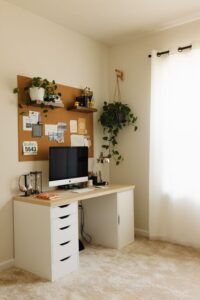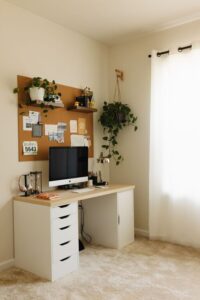

Creating a cozy and functional home office space is essential for anyone working from home or needing a dedicated area for tasks and creativity. A well-designed office can significantly enhance your focus, productivity, and overall well-being. Whether you have a small corner or a spare room, these tips will help you transform your space into an inviting and efficient workplace.
Why a Cozy and Functional Office Matters
Working from home has become increasingly common, and the environment where you work can affect your mood, motivation, and output. A cozy space promotes comfort and helps reduce stress, while functionality ensures everything you need is within reach, minimizing distractions.
Benefits of a Cozy and Functional Workspace
– Increases focus and efficiency
– Reduces fatigue and discomfort
– Encourages better organization
– Enhances creativity and motivation
Step 1: Choose the Right Location
Start by picking a spot with enough natural light and minimal distractions. Ideally, choose a quiet area away from high-traffic zones. If you don’t have a spare room, a corner in your living room or bedroom can work with the right layout and furniture.
Tips for Choosing Your Spot:
– Look for windows to maximize natural light.
– Avoid locations near noisy appliances or busy walkways.
– Consider your daily routine and try to position your office accordingly.
Step 2: Invest in Comfortable Seating
A good chair is a must. Since you’ll spend many hours sitting, comfort and ergonomics are essential to avoid back pain or strain.
What to Look For:
– Adjustable height and backrest
– Lumbar support
– Breathable fabric or mesh
– Sufficient padding
Pair your chair with a desk that matches your height to maintain good posture. Adjustable desks are great if you like alternating between sitting and standing.
Step 3: Optimize Lighting
Lighting can make or break your workspace. Insufficient lighting causes eye strain, while glare can be distracting.
How to Get the Best Lighting:
– Use a mix of natural and artificial light.
– Position your desk near a window but avoid direct sunlight on screens.
– Add task lighting like an adjustable desk lamp.
– Use warm, soft bulbs to create a cozy atmosphere.
Step 4: Organize with Storage Solutions
Clutter can disrupt your workflow. Keep your workspace tidy by incorporating smart storage options to hold papers, supplies, and electronics.
Storage Ideas:
– Floating shelves to save floor space
– Drawer units for small items
– Desk organizers for pens, notepads, and cables
– Filing cabinets for documents
Label your storage to make it easy to find what you need and maintain order.
Step 5: Personalize Your Space
Adding personal touches can make your office feel welcoming and unique without detracting from productivity.
Consider These Ideas:
– A small plant for freshness and improved air quality
– Inspirational artwork or quotes
– Cozy textiles like a throw blanket or cushion
– A bulletin board or whiteboard for notes and reminders
Balance is key—keep personal items minimal to avoid distractions.
Step 6: Manage Technology Efficiently
Make sure your tech setup supports your work without creating clutter.
Tips for Tech Management:
– Use a monitor stand to raise your screen to eye level.
– Keep cables organized with clips or covers.
– Invest in a good quality webcam and microphone for video calls.
– Use wireless devices to reduce cord clutter.
Step 7: Create Zones for Different Tasks
If you have a larger space, consider dividing your office into zones for various activities, such as computer work, reading, or brainstorming.
Examples:
– Desk zone for focused computer work
– Reading nook with a comfy chair and lamp
– Whiteboard or pinboard area for planning and creativity
Having distinct areas can help your brain switch between tasks smoothly.
Step 8: Maintain Regular Cleaning and Decluttering
A cozy and functional office needs upkeep. Set aside time weekly to clean surfaces, dust, and remove unnecessary items.
Quick Maintenance Tips:
– Wipe down your desk at day’s end.
– Empty trash regularly.
– Reorganize drawers monthly.
– Keep digital files organized in folders.
Final Thoughts
Designing a cozy and functional home office takes some planning, but the results are well worth it. By focusing on comfort, lighting, organization, and personalization, you’ll create a space that encourages productivity and makes working from home enjoyable. Remember, your workspace should be a reflection of your needs and style, so feel free to experiment until it feels just right.
With these tips, you’re ready to build a home office space that supports your best work every day. Happy decorating!